

A customer picks a flower bouquet and a perfume from your store and decides to send them as a gift. At checkout, they realize they don't know how to write the greeting, where to enter the recipient's number, or whether the price will show inside the package. The products may be excellent and the wrapping elegant, but the order journey itself was not built for gifting. The problem is not the ad or how the product looks. The problem is that the store treats the gift buyer as if they were buying for themselves.
If you sell flowers, perfumes, chocolates, occasion boxes or even digital products that can be gifted, you need more than the word "gift" on a product photo. This guide shows how to set up the gifting experience on Salla, how to tell the gifting system apart from gift cards and wrapping options, and how to test the whole path before you send customers to it.
The real problem: a gift involves two people, not one buyer
In a normal purchase, the customer chooses the product, enters their address and pays. With a gift, there is a sender who pays, a recipient waiting for the gift, and a store that coordinates between them. Every stage needs clear information. Does the sender know when the gift will arrive? Does the recipient need to confirm their address? Is there a personal message? And who deals with the shipping company?
The clearer these details are inside the store, the less customers rely on private messages to ask questions before they order. This does not mean customer service no longer matters. It becomes free for special cases instead of answering the same questions again and again.
Before you switch anything on: know the three options in Salla
The gifting system: sending a product to someone else
The Salla Help Center explains that the gifting system lets a buyer send a physical or digital product to another person, choose a message or card based on the merchant's settings, and enter the recipient's details. For a shippable product, the recipient gets a link to confirm they want to receive the gift and to enter their address. The merchant then starts shipping based on the order status.
This feature fits when you want one person to pay and another to receive. Keep in mind that, according to Salla's documentation, some products are not covered by the system, and support for the feature also depends on the theme you use.
Order options: wrapping, a message and add-ons
If a customer's order includes premium wrapping, a written card or a special preparation time, these are details of the order itself. Salla's order options guide documents how to add options that collect these requests. Check each option's setup, price and how it appears on the order before you show it to customers. A wrapping option is not automatically the gifting system, and it does not replace the recipient's details.
Gift cards: store credit instead of choosing a product
Sometimes the customer does not know the recipient's taste. Here a gift card is a different option. According to Salla's gift cards guide, you can create a card with a set value, and the recipient spends that value on purchases based on how the card works. In other words, you are selling store credit, not a physical box that needs delivery. Provide a page that explains how to use the card and its terms as they appear in your store settings.
What does the gifting experience look like from the first visit to delivery?
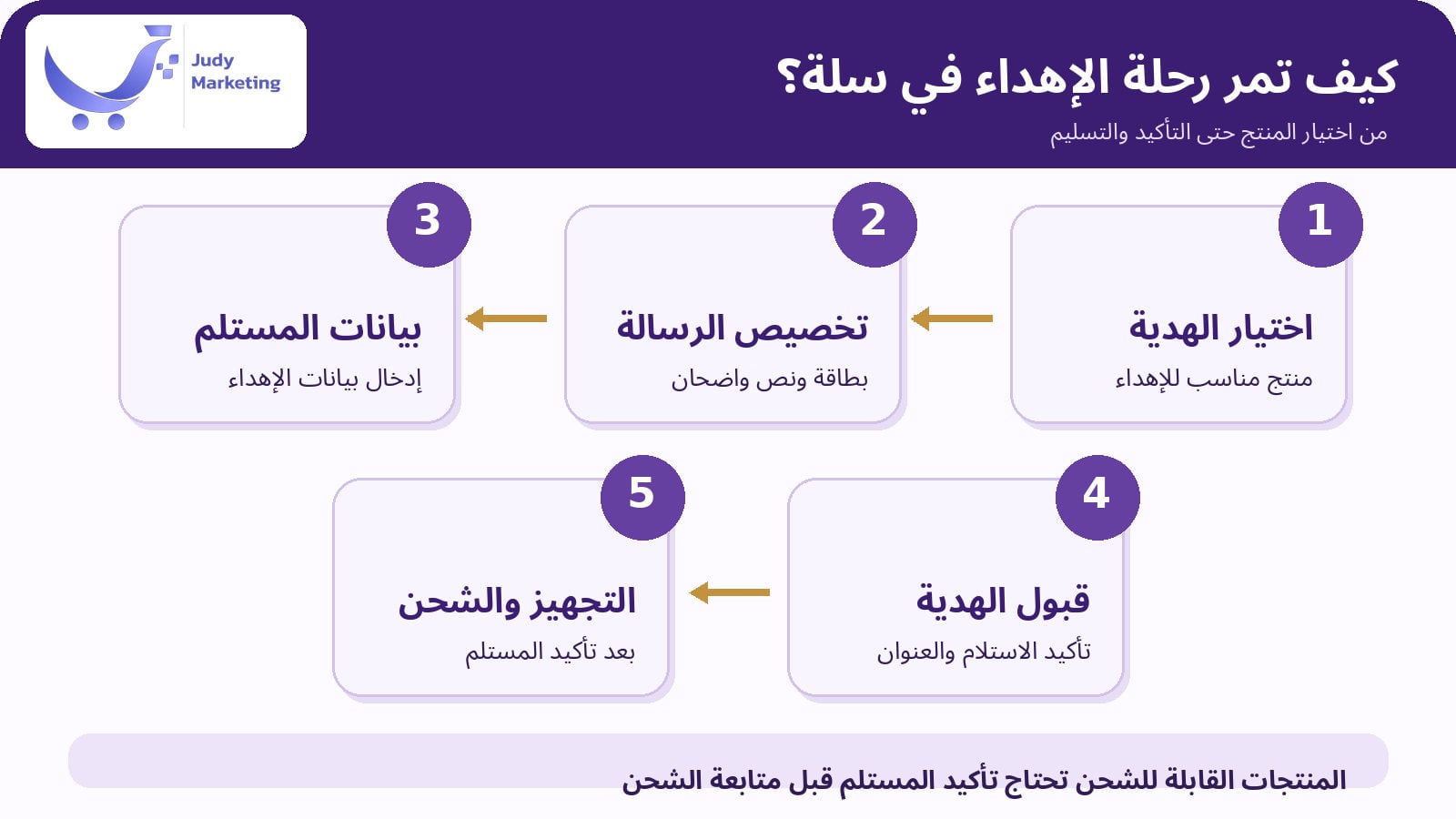
Picture a visitor who wants to send a graduation gift. They start from a clear section for the occasion, pick the bundle, choose the available gifting method, then add a message and pay. If the gift is shippable, the recipient needs to confirm receipt and their address through Salla's system. The order then moves to preparation and shipping, and the sender follows its status from their account. This is the path that must be clear in the design and the text, not hidden between pages.
Test the journey on a phone. Is the gift button visible? Can the message be entered without switching between apps? Does the recipient get a clear message? And does the packing staff know the order is a gift, so they do not put a price slip in it by mistake? These execution details decide the quality of the experience more than the photo of the box alone.
Set up the product page to help customers choose a gift
Photos that show what is really inside
Do not settle for a photo of a closed box. Show the products that come inside it, then a shot of the wrapping and the card if they are part of the order. If wrapping is only an option with an extra fee, say so next to the photo. Do not use a photo of a gift that looks more luxurious than what is actually inside.
Details you should not leave to guesswork
Write the number of pieces, sizes, colors, and the scent or flavor depending on the product, plus the expected preparation and delivery time for your store's service area. If some products are heat-sensitive or fragile, state the confirmed handling requirements. Judy Marketing's article How to write a product description that attracts and sells can help here, but apply its tips to the real product, not to exaggerated promotional phrases.
Options appear before payment
If you offer more than one type of wrapping, card or greeting text, make the price and the choice clear before payment. Do not let customers discover an extra wrapping cost at the last step. Check on a phone that the options are easy to select and do not disappear below other elements.
Practical steps to turn on the gifting system in Salla
According to the official guide updated on 31 August 2026, you can set up the gifting system from the dashboard. Some menu names may change with Salla updates, so keep the official gifting system guide open as a reference while you work.
- From the dashboard, go to Apps or the system settings linked to gifting, depending on the interface you see, then open the gifting system and turn it on for your store.
- Choose the markets where gifting should appear if the multi-market feature is available to you, and make sure your shipping settings match each market's coverage.
- Prepare short sample greetings that suit different occasions, and allow custom messages if that option is available and fits your business.
- Upload clear gift cards that match your brand, and check that they show on mobile without being cropped or having tiny text.
- Test gifting one product, then, if it suits your business, test sending several products from the cart within the supported type.
- Place a safe test order using what your store allows, and review what the sender sees, what the recipient sees, and what shows on the order page for your fulfillment team.
Important note: Salla's documentation explains that digital and physical products cannot be combined in one gift cart. The system also excludes some made-to-order products, so check that your items are compatible before you promise customers they can gift them through the system. According to the guide, all themes developed by Salla support the system. For other themes, check with the theme developer.
How do you coordinate with the recipient without exposing their details?
For shippable products, do not assume the sender has the recipient's final address. As Salla explains, the recipient confirms they accept the gift and adds the delivery address details, and the address is hidden from the sender to protect the recipient's privacy. The recipient can edit address details within the same city or the allowed shipping area. This does not mean they can freely change the country or the city.
Add a simple line to your FAQ page: "If the gift is shippable, you will receive a link to confirm receipt and enter your address, following the store's gifting steps." Do not ask the sender to share another person's address outside the official path without need, and never put the recipient's details on the gift card.
When should you use gift cards instead of a ready gift box?
A gift card suits people who prefer to leave the choice to the recipient, such as an employee who wants to congratulate a colleague, or someone who does not know the recipient's size or favorite scent. A real gift box, on the other hand, suits cases where the personal touch and the wrapping are part of the value. Be clear in your store: "a gift card to choose later" is different from "a product sent as a gift now".
According to Salla's instructions, discount coupons and promotions do not apply to gift cards in the context its guide describes. So review the offer terms before you announce a general discount on all store products.
Worked example: a perfume store prepares a graduation gift
This is a made-up example for illustration, not a real customer case. A store sells a perfume with a box and a greeting card. At first, buyers sent a WhatsApp message to ask for a name to be written and to ask whether the gift could be delivered to someone else. The suggested fix is not a new ad. It is a clear gifting path: a page with the gifting option, real photos of the box, a customizable message if it is turned on, then the steps for the recipient to accept the gift and confirm their address.
After setting it up, the store owner tests an order from their phone and uses a second phone to receive the gift message. They also check how the packing team will print the card and whether the price will show with the gift. We cannot promise a specific sales increase from this change alone, but the owner can measure whether the order steps became clearer and whether repeat questions went down.
Which mistakes ruin the gifting experience, even with a beautiful product?
- Wrapping photos that do not match what the customer receives, or not saying whether wrapping costs extra.
- Mixing up a gift card that holds store credit with a greeting card that comes with the product.
- Leaving the city or delivery area unclear, then accepting orders you cannot fulfill.
- Not checking that the gift message arrived or that the recipient confirmed before trying to create the shipping label.
- Relying on a theme that does not support gifting without asking its developer or testing it.
- Adding so many options that the buyer gets confused, instead of a few options with clear names and prices.
- Forgetting to prepare a short guide for staff: preparing the order, writing the card, wrapping, and checking whether the recipient has accepted.
Test before launch: ask someone else to buy a gift
Knowing where you put the gift button is not enough. Give someone who does not know the store a simple task: "Send a gift to someone in a supported city." Watch the questions they ask without explaining anything. These notes help you find the unclear points in your text and design before you announce the feature.
- Did they understand the difference between buying for themselves and sending a gift?
- Did they find the gift message and the card easily?
- Did they know whether wrapping was included or optional, and when the shipment would arrive?
- Were the order costs clear before payment?
- Did the gift message reach the recipient? Could the recipient confirm receipt?
- Did the needed preparation instructions show in the store dashboard?
How do you know the improvement is working?
Before changing the gifting experience, record how many repeat questions you get about wrapping, greeting cards and recipients' numbers, and how many orders need manual edits. After the new path goes live, watch the same numbers, keeping seasons and campaigns in mind. If questions drop and manual order edits go down, that is a useful operational sign, but on its own it does not prove higher sales.
Also ask customers after delivery how clear the experience was. Some feedback will never show in your stats dashboard: a card that is too small, wrapping that is hard to open, or a message that arrived late. These improvements cover the full experience, from the order to the moment the gift arrives.
When do you need professional help designing a gift store?
If you have the gifting feature but customers cannot find it, if your product pages do not explain the customization options, or if you need a consistent design across the storefront, cards and sections, you may need a review of the store experience before buying any extra development. Start by pinpointing where customers get stuck and on which page, instead of asking for a "luxury design" with no goal.
Judy Marketing offers Salla store setup and design services, and you can discuss with the team how to prepare your gift store's storefront and product pages so they support the buying journey and make the platform's existing gifting options visible. This does not mean Judy Marketing offers shipping, gift management or any specific integration unless it is part of the service agreement. Start by asking for a clear assessment of what your store needs and the scope of the design.
Common questions before setting up a gift store on Salla
Is the gifting option different from adding gift wrapping?
Yes. The gifting system handles sending a product to another person and the steps for them to accept the gift. Wrapping or a greeting card are order options you may add for personalization. You can use both together when your store settings allow it.
Can I gift a digital product and a shippable product in the same order?
Salla's documentation explains that digital and physical products cannot be combined in one gift cart. You need to send each type separately.
Do all themes support the gifting system?
According to Salla, the themes it develops itself support the system. If your theme comes from a third-party developer, check that it supports gifting before you approve the design or launch a campaign.
Does the system send the gift without the recipient's confirmation?
For shippable products, the recipient is asked to confirm they want the gift and to give the address details before shipping goes ahead. Do not treat the payment as confirmation that the shipment will be received.
The bottom line: start from the experience of the person giving the gift
A gift store does not just need more decoration. It needs a buying journey where the sender knows what to choose and what they will pay, the recipient knows how to confirm the gift, and the store team knows how to fulfill the order. Start with one product, turn on only the options you really need, test them on a phone, then expand the experience step by step. If you need help organizing your storefront and product pages, look at Judy Marketing's Salla store design services and discuss clear requirements before work begins.