

Your customer asks you, "Why can't I pay with Tabby or Tamara?" and you have not even managed to activate the service on your store. Maybe you applied and got no reply, or you were asked for more documents, or you have an approved merchant account but the payment method does not show on the checkout page. Each of these cases needs a different check. Sending the same request again the same way will not necessarily fix the problem.
This guide is for Salla store owners in Saudi Arabia who want to prepare their file correctly, understand the difference between the providers' requirements, and make sure the application and integration path is right. The goal is for you to know what to review and when to contact the right party. We are not promising guaranteed approval or activation.
Before you say "my request was rejected", find out exactly where it stopped
There is a big difference between a request still under review, a request missing documents, an actual rejection, and an approved account that is not connected. Open the email linked to your registration and your Salla payments dashboard, and check the latest documented status you have.
- The request was not sent: the problem is in the steps or the data required before sending, and you may need to review your store settings.
- The request was sent and you have no decision: check your email, messages and the provider's dashboard, then follow up through the official channel instead of assuming a rejection.
- Completion requested: prepare the exact document requested, and do not upload random files unrelated to the reviewer's note.
- A clear rejection arrived: ask the provider itself for the reason or whether you can apply again. Review reasons are not always shared with the merchant.
- Approved but the payment method is not showing: here the problem may be in the integration, the settings or testing, not in the application.
Keep the status message, the request number if there is one, and the date of your last contact. This simple record stops repeated messages and gives anyone helping you a clear picture of the stage you are at.
Do Tabby and Tamara ask for the same documents?
The answer: do not assume so. Both need to know your business and verify its details, but eligibility and approval requirements differ by provider, business type, sales channel and country. Confirm the requirements for your case on the provider's own portal, not from a list shared on social media.
Tamara requirements: commercial register or freelance document, depending on the business
Tamara for Business explains that it accepts different types of businesses, including online stores and some freelancers. Its basic documents include ID and proof of business. That may be a commercial register with a business IBAN, or a freelance document with a personal IBAN where allowed. It may also ask for more documents. According to the Tamara Help Center, you may also be asked for proof of IBAN and a VAT certificate if it applies.
But note: for some sectors, Tamara requires a commercial register instead of a freelance document. So do not just say "I have a freelance document". First check that your business is eligible and which document is accepted for it. Also, the online presence Tamara accepts in its general application does not automatically mean that connecting it to a Salla store skips Salla's own requirements.
Tabby requirements: a registered business, a sales channel and a suitable bank account
Tabby for business partners explains that a merchant needs a business registered according to the country's requirements, an active sales channel, valid business documents and a bank account in the business name. Its official application steps show that the form asks for company, store and contact details, and you may be asked for a business, tax or bank document.
Do not rely on general statements like "Tabby accepts any document" or "Tabby rejects all new stores". These are generalizations with no evidence behind them. Use the requirements you see when you apply, and ask Tabby to explain your case if you get a rejection.
What does Salla add to the integration path?
Salla's guides, updated in August 2026, explain that Tabby and Tamara are connected from the Payment Methods section, that the store needs to be verified, and that the feature is available on the Plus and Pro plans according to the published documentation. So your account may be a good initial fit for the provider, but you still need to meet the platform's integration requirements before the payment method appears in your store.
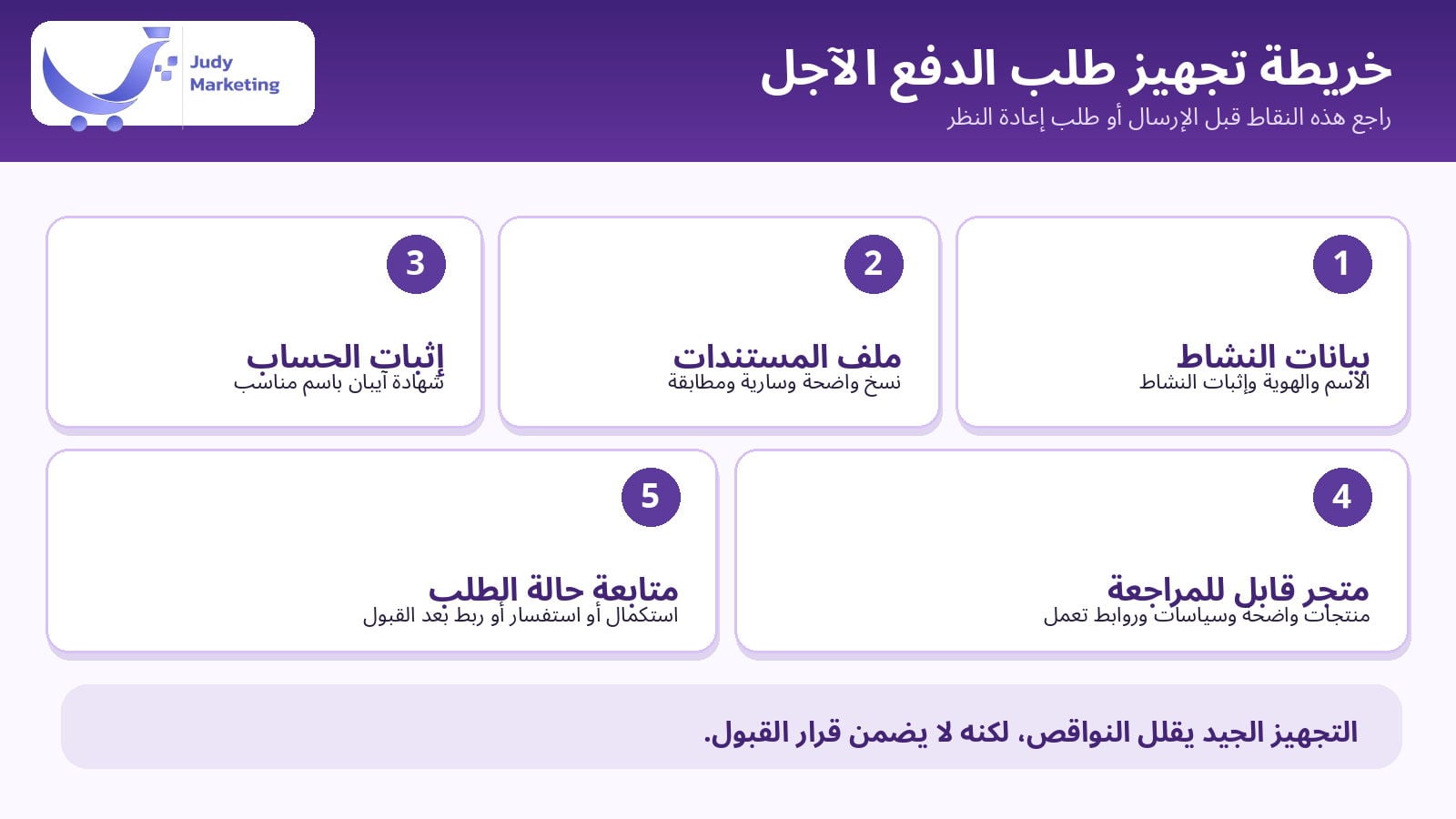
Readiness check: five points to review before you send the request
1. Make sure your business details are clear and match
Start with the business name on the register or document, the name of the authorized signatory, the ID number and contact details. Do not change how the name is written from one file to another unless there is a clear legal reason. Any difference is worth reviewing before you send documents. If your business is in a sector with extra requirements, check with the payment provider before you submit.
2. Prepare readable documents
Open each document on your phone before uploading it. Are all the edges visible? Are the name and date clear? Is the file still valid? And is a tax certificate actually required in your case? Do not add fake documents or edit the details of an official document. If a new copy is needed, get it from the issuing authority.
3. Check your IBAN certificate and the beneficiary name
Some activation requests stall on bank information or on a completion request about it. Make sure the IBAN is correct, that the bank proof shows the account holder's name the way the provider asks, and that using a personal or business account fits your type of business proof. Do not send sensitive bank details through untrusted links or people.
4. Open your store as if you were an outside reviewer
The reviewer needs to understand what you sell and how a customer orders. Open your store link in a private window. Are the products showing with their prices? Are the product descriptions correct? Is there a contact page and shipping and return policies that can be reached? Do the image and category links work? Having these elements is not a checklist that guarantees approval, but it removes needless doubt about your store's activity. If you need to improve your product page, read Judy's article How do you write a product description that attracts and sells?.
5. Check your verification status, plan and payment options
In your Salla dashboard, check your store verification status and the plan you are on. Then open Payment Methods and make sure you select Tabby or Tamara through the official path. Do not rely on an old screenshot of the dashboard, since button names can change. Use the guide to activating Tabby on Salla or the guide to activating Tamara on Salla when you do it.
How do you send the account request from the Salla dashboard?
In Salla's two official guides, the documented path starts from the main menu, then Settings and Tools, then "Payment Methods", and from the "Buy Now, Pay Later" section you choose the right provider. For Saudi stores, the "Send a business account request" option is shown when it is available for your case.
Activating Tabby: from application to integration
- Open "Payment Methods" in your Salla dashboard, then choose "Tabby" from the pay-later section.
- Choose "Send a business account request" if it is available, and review the information Salla will share with Tabby.
- Enter the bank account holder's name in English as the form asks, agree to share the data after reading it, then send.
- Watch for the approval message in your email and in the Tabby settings. Only after approval, enter the integration keys in the right place and save.
If you already have a Tabby business account, Salla's guide includes an option to connect an existing account using its own keys. Do not share integration keys in public messages or with anyone who is not authorized.
Activating Tamara: sending the request vs. connecting the account
- From "Payment Methods", choose "Tamara" among the pay-later options.
- Choose "Send a business account request" if this path is available for your store in Saudi Arabia.
- Watch for Tamara's review or approval notice. Sending the form does not mean the merchant is approved.
- Once approved, the account is connected using the Merchant Key and Public Key as explained in Salla's guide, then the settings are saved after you review the usage policy.
Do not add test data to a live account, and do not use another account's keys. If the option does not appear as described, check the provider's guide in the Salla Help Center or contact support, instead of repeating steps from an old interface.
You got a completion request or a rejection: what should you do?
Start with the message itself. Is a specific document required? A number to correct? A link to confirm? Or is it a final rejection? Decide what to do before you reply, and do not keep submitting new requests just because you do not know the reason.
- A document completion request: send the correct copy requested, in the format the provider specifies.
- Information that does not match the document: check the official source of the information, the name and the IBAN, then correct it with the right authority.
- A note about the business or its products: ask whether the business can be accepted and which document it needs before you change how you present your products.
- A rejection without enough explanation: contact the payment provider's support and ask whether the reason can be fixed or whether reapplying is not possible for now.
- Approved but the payment method is not showing: check the integration keys, the Salla settings and the merchant account activation status, then use the right support channel for the technical issue.
You can send the provider a short, clear inquiry: "I applied to activate a merchant account for my store on (…), request number (…) if available, and received the status (…). Please clarify the document or action needed to complete the review, and whether the current request can be updated or a new application is needed." Do not attach an ID photo or bank account details except through the official, trusted channel.
A hypothetical example: the request was sent but the payment method did not show
Imagine a home products store that applied for Tabby, then received an approval message, but the owner could not find the payment method at checkout. The mistake here would be to assume the request was rejected again and reapply. The better move is to go back to the Tabby settings in Salla. Did the owner enter the keys of the approved account? Were the integration settings saved? Does the payment method show in a suitable test purchase? If the account is approved and the integration is complete, the owner passes the issue to support with the time of the test and non-sensitive screenshots.
This example is for illustration only. It is not a Judy client case or a documented result from a particular store. The rule it shows: identify the stage before you choose the fix.
After approval: do not stop at seeing the payment logo
Test a buying journey under safe, permitted conditions according to your store settings. Make sure the payment method appears where it should, that the order details and cost are clear, and that the order moves to the right status. Also review the fees, commissions, settlement terms and refund terms in your contract with the provider. Do not assume contract details are the same for every merchant.
And do not tell customers that every installment payment will be approved automatically. Buyer eligibility, the number of payments and the available terms depend on the payment provider, the case and the contract. Better payment options may help some buyers, but they do not guarantee completed orders or a specific increase in sales.
When is it worth getting a specialized service instead of trying alone?
If your documents are valid but you are unsure how to organize them or how to send the request, or you already got a completion request and do not know how to handle it, practical help here means organizing the file, following up on the request and coordinating the integration once approved. This is a different service from promising you approval. The final decision stays with Tabby or Tamara.
Judy Marketing offers a service to help you register with Tabby and Tamara. According to its description, it includes preparing and submitting the request, following up and connecting the account once approved, with conditions related to paid Salla plans and a custom domain, and a maximum number of resubmissions. Read the service details, terms and the price for your chosen provider before ordering, and do not treat buying the service as a replacement for meeting the payment provider's requirements.
Frequently asked questions before you apply for Tabby or Tamara
Is Tabby or Tamara activation guaranteed if I have a commercial register?
No. A commercial register helps prove your business, but it does not mean automatic approval. Each provider has its own eligibility and review process, and a request can be rejected. Make sure your documents are complete and ask for clarification of your status when needed.
Is a freelance document enough for both providers?
Do not mix up the requirements. Tamara offers a path for the freelance document for some businesses, while Tabby's documents state the need for a legally registered business, documents and a suitable bank account. Check the exact requirements for your business, and do not treat one document as enough for both without approval.
Do I need a paid Salla plan?
Salla's published guides for activating Tabby and Tamara state that the feature is available on Plus and Pro, and that the store must be verified for the integration. Check your current plan and Salla's updates before applying.
I applied and got no reply. Does that mean rejection?
No. Not getting a reply does not mean rejection on its own. Check your spam folder and the merchant dashboard, then ask the payment provider about the request status using the reference details you have.
Can Judy guarantee approval or speed up the provider's decision?
There are no guarantees of approval. Judy states clearly that the service covers preparing the request, following up and connecting the account once approved, and that registration approval is subject to the terms and review of Tabby or Tamara.
The bottom line: check the stage before you reapply
If pay-later activation is stuck on your store, start by sorting out the case. Was the request not completed, does it need a document, was it rejected, or was it approved but not connected? Then review your business, IBAN, store and plan, and follow the provider's official guide. If you need someone to organize your registration file and follow up on the integration within the scope of the service, see Judy's service for help with Tabby and Tamara registration and read the terms before ordering. The final approval decision does not belong to a design or marketing agency. It belongs to the payment provider itself.